Beam Test Pipeline Overview
Currently being updated
The pipeline automatically retrieves all online data produced by LATTE which are currently stored in directories associated with runs numbers and brings them to the SLAC farm. After that, it populates an ORACLE database which provide queries to the data. The pipeline also creates reports, and launches data processing/reconstruction code to produce data files and high level analysis ntuples.
A pipeline diagram can be seen below 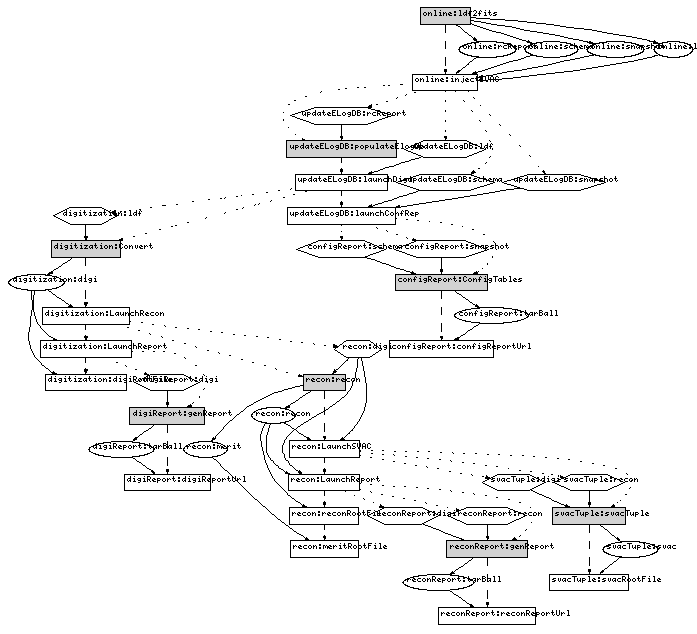
Note that this diagram is not current, the recon task is more complex now. Rectangles represent TPs, the first one in a task is shaded. Ellipses represent files, while hexagons represent symbolic links.
The xml files used for upload are located in /afs/slac/g/glast/ground/PipelineConfig/BeamTest-tasks/beamtestPipeline/current
They are generated by running scripts when installing the code.
Need an explanation of how the tasks get launched by FastCopy
Some existing documentation can be found in /afs/slac/g/glast/ground/PipelineConfig/BeamTest-tasks/beamtestPipeline/current/doc.
install.txt and operation.txt may both be read directly, but need to be updated. Running make in the doc directory will use IAndTPipeline.tex and several .dot files to make a .pdf.
Policy for updating tasks
Describes policy and steps for updating
Environmental Variables
Setting up the environment so that one can acess the ORACLE database
Source /u/gl/glast/pdb_config/dpf_config_prod.csh (or .sh if you use BASH) to run the pipeline text-mode management tools, which are installed in $PDB_HOME (which is set by the config script).
The environment variable beamtestPlRoot must be set to point to the location where the scripts are installed.
There is a master configuration file (setup/svacPlSetup.cshrc) that sets disk locations, code versions, and all kinds of fun stuff. It sets over 100 environment variables that are needed at task install or run time.
----BeamTestRelease is run from an AFS volume. When a new release is used, it must be either built on the AFS volume or copied there from the regular build area in NFS. Then the cmt directories have to be configured to point to the new location. There are 10 AFS volumes that are shared by MC, SVAC and beamtest pipelines. They are all mounted under /afs/slac.stanford.edu/g/glast/ground/releases as volume01-volume10. There's also a file in that directory, VOLUME.USAGE, where you can claim your space.
BeamTestReport should be relinked against the new version of BeamTestRelease.
Neither BeamTestELog nor ConfigTables need to be relinked, as they are implemented in Python.
Pipeline Tasks and Associated Scripts
Each pipeline task consists of several c-shell, python and perl scripts.
Pipeline tasks are structured as a linear chain of steps. Each step must succeed before going on to the next one. Each step must be attempted, until one fails or the last one succeeds. That is to say, there is no flow control, and no parallelism. In order to deal with this, and to reduce the chance that a step would not be reached due to the failure of a previous step on which it did not logically depend, the work we do in the pipeline is split into 7 tasks, all but one of which (updateELogDB) are launched by other tasks. This launching is done without GINO's (the pipeline infrastructure) knowledge.
The sequence of steps within a task is set by an XML file that is uploaded via the GINO front end to create the task. This file also sets up input & output files, what code to run, which batch quesues to run it on, etc. The XML files are generated by perl scripts in the task directories under $beatestPlRoot.
There is no file, script, datastructure, or anything outside the maintainer's head that codifies the global structure of it all.
Tasks launch other tasks using the $beamtestPlRoot/lib/TaskLaunch.pl script. My convention has been that I launch each task in a separate TP. The TP and the script and wrapper that it uses have names beginning with "Launch".
The names of files registered with GINO is constrained to follow a certain format. When one task produces a file that is used as input to another task, the name given by the first task is not the name expected by the second one. Thus, part of the process of one task launching another is to create symbolic links with the name expected by the downstream task.
Most steps within a task (Task Processes (TPs)) consist of a wrapper, which interfaces with GINO and a script which does the work, usually by running some external app. The digi & recon reports, and beamtest tuple, create a c-shell script and then execute it.
The code for the bt pipeline is found in /afs/slac/g/glast/ground/PipelineConfig/BeamTest-tasks/beamtestPipeline/current
The cvs repository for the code is BeamTestPipeline. It contains a modified copy of svac/svacPipeline with the following features:
- based on SVAC pipeline
- minimal changes necessary to make it work
The list of pipeline taks is provided below (in the alphabetical order) with the information how to run them.
Task Name: configReport
Description: Makes instrument configuration report.
Uses external app ConfigTables, which is in SAS CVS as svac/ct2.
Purpose |
Associated Scripts |
Input |
Output |
Comments |
|---|---|---|---|---|
make config report |
configTablesWrapper.pl |
|
|
pipeline side |
make XML file defining task |
genXml.pl |
|
|
currently makes 2 XML files, LICOS version should be removed |
Task Name: digiReport
Description: Makes digitization report.
Uses external app BeamTestReport.
Purpose |
Associated Scripts |
Input |
Output |
Comments |
|---|---|---|---|---|
make digi report |
genDigiTestReport.pl |
|
|
external side |
make digi report |
genDigiTestReportWrapper.pl |
|
|
pipeline side |
make XML file defining task |
genXml.pl |
|
|
|
Task Name: digitization
Description:
Purpose |
Associated Scripts |
Input |
Output |
Comments |
|---|---|---|---|---|
determine whether to reconstruct run |
decideRecon.pl |
|
|
|
start digitization task |
genDTRLaunchWrapper.pl |
|
|
pipeline side |
make XML file defining task |
genXml.pl |
|
|
currently makes 2 XML files, LICOS version should be removed |
digitize LDF data |
ldfToDigi.pl |
|
|
external side |
digitize LDF data |
ldfToDigiWrapper.pl |
|
|
pipeline side |
launch recon task |
recLaunchWrapper.pl |
|
|
pipeline side |
|
reprocess-v2r0.csh |
|
|
delete |
|
reprocess.csh |
|
|
probably delete |
|
reprocessEM2.csh |
|
|
delete |
|
retDefToDigiWrapper.pl |
|
|
LICOS stuff, not used by beamtest |
|
setEvents.pl |
|
|
LICOS stuff, not used by beamtest |
|
setEventsWraspper.pl |
|
|
LICOS stuff, not used by beamtest |
Task Name: eLogupdate
Description: loads the database
Purpose |
Associated Scripts |
Input |
Output |
Comments |
|---|---|---|---|---|
|
archiveWrapper.pl |
|
|
not used |
start ConfigTables task |
ConfTLaunchWrapper.pl |
|
|
pipeline side |
determine whether to digitize run |
decideDigi.pl |
|
|
|
make XML file defining task |
genXml.pl |
|
|
currently makes 2 XML files, LICOS version should be removed |
start digitization task |
ldfTDLaunchWrapper.pl |
|
|
pipeline side |
enter run in eLog |
populateElogDb.pl |
|
|
external side |
enter run in eLog |
populateElogDbWrapper.pl |
|
|
pipeline side |
|
retDefTDLaunchWrapper.pl |
|
|
not used by beamtest |
Task Name: lib
Description:
Purpose |
Associated Scripts |
Input |
Output |
Comments |
|---|---|---|---|---|
used by cleanupRecon.csh, gets rid of junk on one host |
_cleanup0ne.csh |
|
|
utility, not used in pipeline |
clean up junk left on local disks of batch hosts by failed chunks |
cleanupRecon.csh |
|
|
utility, not used in pipeline |
shared by all TPs that copy files |
copyWrapper.pl |
|
|
pipeline side |
reset eLog links to reports & ROOT files so there isn't a confusing mixed set of versions while reprocessing |
deleteLinks.csh |
|
|
utility, not used in pipeline |
shared by all TPs that delete files |
deleteWrapper.pl |
|
|
pipeline side |
merge tuple chunks into single file |
haddMerge.py |
|
|
external side |
merge tuple chunks into single file |
haddWrapper.pl |
|
|
pipeline side |
|
makeLinks.pl |
|
|
not used |
look things up in eLog |
queryElogReportTable.pl |
|
|
|
launch a task from within another task |
TaskLaunch.pl |
|
|
|
Sometimes thigs don't work, and you try again and it's fine. Usually due to some transient NFS issue. |
tryAFewTimes.csh |
|
|
|
change things in eLog |
updateElogReportTable.pl |
|
|
|
Enter links to ROOT files and data reports into the eLog DB. |
updateUrl.py |
|
|
|
Enter links to ROOT files and data reports into the eLog DB. |
urlWrapper.pl |
|
|
pipeline side |
Task Name: offLineTest
Description: I don't even know what this is.
Purpose |
Associated Scripts |
Input |
Output |
Comments |
|---|---|---|---|---|
|
setup.csh |
|
|
|
|
test.pl |
|
|
|
Task Name: online
Description:
The files in this directory are used to launch a run. They are intended to minimize the required knowledge of how all of this stuff works. This simplifies the job of external systems that need to launch runs, and allows us to make internal changes without having to agree on a changed interface.
Purpose |
Associated Scripts |
Input |
Output |
Comments |
|---|---|---|---|---|
launch a run |
BeamTestLaunch.pl |
|
|
|
|
LicosLaunch.pl |
|
|
not used |
|
SVACLaunch.pl |
|
|
not used |
|
SVACWrapper.pl |
|
|
not used |
|
getAlgFile.pl |
|
|
not used |
Task Name: recon
Description:
The recon task is relatively complex. It splits a run into chunks, submits each one for reconstruction as a batch job (without GINO's knowledge), then merges the reconstructed chunks.
The first step, setupRecon, has almost all of the intelligence. It decides how many chunks to use and which events will go in which chunk. It writes a number of files which direct the action of later steps, including jobOptions files for reconstruction of the chunks.
doRecon controls the reconstruction of the chunks. It reads a list of jobs to run, and for each one, spawns a thread that submits a batch job, waits for it to complete, and returns its status. It then writes a file listing which, if any, of the chunks failed, and exits with an unsuccessful return code if there were failed chunks. When the TP first starts, it checks for this list of failed chunks, and if it is present and nonempty, it uses it instead of the original list of all chunks writted by setupRecon. This way, if some chunks fail, the TP can be rolled back and it will only need to redo the failed chunks. The failed chunk list is not registered as a pipeline dataset, since it violates logical constraints within GINO for a TP to modify its input files.
In order to avoid problems with unreliable NFS service, the chunk jobs copy the input digi file to a local disk on the batch host (if it has one, I think they all do now) and writes the output files there as well. It then moves the output files to a staging directory on AFS, and deletes the local copy of the input file. When chunks fail, these files are left behind and eventually fill up the local disk. Therefore, there is a script to seek out and delete these orphaned files. It must run as user glastdpf. I usually log into a noric as glastdpf and run it by hand every once in a while, but a better solution would probably be to wrap it in a task and run that task every night from my crontab.
Space on the AFS staging disk is a bottleneck on how fast we can run data through the pipeline. It is shared by the SVAC and beamtest pipelines.
Merging the chunks of the recon file uses 4 TPs. The first (mergeRecon) performs the actual merge, from chunk files on the staging disk to a recon file on the staging disk. The second deletes the chunk files from the staging disk. The third copies the merged recon file from the staging disk to its final destination on NFS. The fourth deletes the merged file from the staging area. This may seem unreasonably complicated, but it reduces the amount of work that must be redone on a rollback, and in some cases a rollback wouldn't work otherwise - we used to get situations where something would fail after the chunks had ben deleted, and we'd have to redo the reconstruction. Deleting the chunk and staged merged files could be done in a single TP at the end of the sequence, but doing it this way saves space on the staging disk.
Once the recon file is merged & moved, the reconReport and svac or beamtest tuple tasks are launched so that the can run while later steps are happening.
Merit and CAL files are merged in 4 TPs each, similarly to recon, but these files have a sufficiently simple structure that they can be merged with hadd instead of the custom pyRoot script used for recon.
3 more TPs enter URLS for the recon, merit, and CAL files into the eLog DB.
The final step (cleanup) just removes directories that were created in the staging area by the setup step. If the directories are not empty, the attempt to remove them will fail. This indicates that there was a problem ealier in the task. This should be investigated before removing the offending files by hand and doing a rollback.
Purpose |
Associated Scripts |
Input |
Output |
Comments |
|---|---|---|---|---|
finish up a run |
cleanup.py |
|
|
external side |
finish up a run |
cleanupWrapper.pl |
|
|
pipeline side |
control job for reconstruction of chunks |
doRecon.pl |
|
|
external side |
control job for reconstruction of chunks |
doReconWrapper.pl |
|
|
pipeline side |
launch reconReport task |
genRTRLaunchWrapper.pl |
|
|
pipeline side |
make XML config file for task |
genXml.pl |
|
|
|
merge chunks of recon file |
mergeRecon.py |
|
|
external side |
merge chunks of recon file |
mergeReconWrapper.pl |
|
|
pipeline side |
|
recon.py |
|
|
obsolete |
reconstruct one chunk |
recon0ne.csh |
|
|
|
|
reconWrapper.pl |
|
|
obsolete |
|
reprocess-licos.csh |
|
|
delete |
|
reprocess-v3r1p5.csh |
|
|
delete |
|
reprocess-version.csh |
|
|
delete |
launch beamtestTuple task |
RunRALaunchWrapper.pl |
|
|
pipeline side |
prepare chunk jobs |
setupRecon.py |
|
|
external side |
prepare chunk jobs |
setupReconWrapper.pl |
|
|
pipeline side |
Task Name: reconReport
Description: Makes recon report.
Uses external app BeamTestReport.
Purpose |
Associated Scripts |
Input |
Output |
Comments |
|---|---|---|---|---|
make recon report |
genReconTestReport.pl |
|
|
external side |
make recon report |
genReconTestReportWrapper.pl |
|
|
pipeline side |
make XML file defining task |
genXml.pl |
|
|
|
Task Name: setup
Description:
Purpose |
Associated Scripts |
Input |
Output |
Comments |
|---|---|---|---|---|
setup for database access |
dbSetup8.cshrc |
|
|
Oracle 8, used by Python scripts |
setup for database access |
dbSetup10.cshrc |
|
|
Oracle 10, used by Perl scripts |
master setup file |
svacPlSetup.cshrc |
|
|
used by everything |
Task Name: svacTuple
Description: Makes beamtest tuple
Uses external app BeamTestTuple (part of BeamTestRelease).
Purpose |
Associated Scripts |
Input |
Output |
Comments |
|---|---|---|---|---|
make beamtest tuple |
RunRootAnalyzer.pl |
|
|
external side |
make beamtest tuple |
RunRootAnalyzerWrapper.pl |
|
|
pipeline side |
make XML file defining task |
genXml.pl |
|
|
|
|
reprocess-licos-v3r5p5.pl |
|
|
delete |
|
reprocess-v3r4p6.csh |
|
|
delete |
|
reprocess.csh |
|
|
delete |